How Interac e-Transfer Works in Canada is a common way to send and receive money through participating Canadian banks and credit unions. Newcomers often use it for everyday payments such as sending money to a roommate , paying a small service provider , or receiving money from someone they know.
Who this guide is for
This guide is for newcomers , international students , temporary workers , and first-time residents who are learning how digital banking works in Canada. It explains the basic idea in plain language and highlights safety points to check before sending money.
Practical explanation
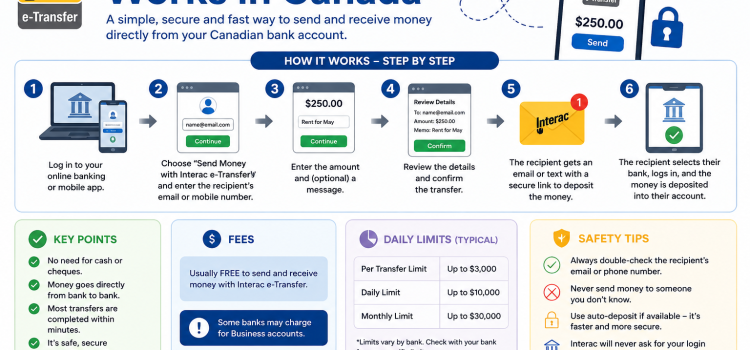
Interac e-Transfer is usually accessed inside online banking or a mobile banking app. A sender chooses a recipient , enters an amount , adds a message if needed , and confirms the transfer. Depending on the recipient setup , the recipient may receive a notification by email or text message , or the money may be deposited automatically if Autodeposit is enabled.
How Interac e-Transfer Works in Canada can feel simple , but it is still a real money transfer. You should only send money to people or businesses you trust. Once a transfer is accepted or deposited , getting the money back may be difficult.
Basic steps
- Sign in to your bank or credit union app.
- Choose the Interac e-Transfer option.
- Add or select the recipient.
- Enter the amount and review the details carefully.
- Use Autodeposit when available , or create a security question that is not easy to guess.
- Confirm the transfer and keep a record for your budget.
Checklist before sending money
- Confirm the recipient name , email address , or mobile number.
- Check the amount before tapping send.
- Do not share banking passwords or one-time codes.
- Be careful with urgent messages asking for money.
- Check your bank account for daily or transaction limits.
- Read your bank fee schedule if you are unsure about costs.
Common mistakes to avoid
A common mistake is sending money too quickly because someone creates pressure or urgency. Another mistake is using a weak security answer that someone can guess from social media or previous messages. Newcomers should also avoid sending deposits for rentals , jobs , or online purchases before verifying that the person or business is legitimate.
| Situation | What to check |
|---|---|
| Rent deposit | Confirm the landlord , lease details , viewing , and local rental rules before sending money. |
| Buying used items | Meet safely , verify the item , and avoid pressure to pay before seeing it. |
| Receiving money | Use Autodeposit when possible and be careful with fake notification links. |
FAQ
Is Interac e-Transfer instant?
Many transfers are fast , but timing can vary depending on the bank , amount , recipient setup , and security review. Check your financial institution for details.
Can I cancel an Interac e-Transfer?
You may be able to cancel a transfer if it has not been accepted or automatically deposited. Once it is deposited , cancellation may not be available.
Does Interac e-Transfer have fees or limits?
Fees and limits depend on your bank account , financial institution , and plan. Some accounts include transfers , while others may charge fees. Always check your own account agreement.
Is Interac e-Transfer safe?
It can be safe when used carefully through your official bank app or website. Avoid clicking suspicious links and never share passwords , card PINs , or verification codes.
Disclaimer
This article is for general information only and does not provide financial , legal , tax , or immigration advice. Rules , requirements , fees , and programs may change. Always check official sources or speak with a qualified professional before making decisions.
Sources or official resources
- Interac official website
- Your Canadian bank or credit union website
- Financial Consumer Agency of Canada
- Canadian Anti-Fraud Centre
Conclusion
How Interac e-Transfer Works in Canada is useful for everyday banking in Canada , but it should be used carefully. Review the recipient , amount , fees , and security details before sending money. For newcomers , the best habit is to slow down , verify the request , and use only official banking apps or websites.
Extra safety notes for newcomers
Newcomers should be especially careful when a payment request is connected to housing , employment , online buying and selling , or immigration paperwork. A real landlord , employer , government office , or bank should not pressure you to send money immediately through a message thread without giving you time to verify the request. If someone says the offer will disappear unless you send an Interac e-Transfer right away , slow down and check the details through another trusted source.
For rental situations , try to confirm the address , the landlord or property manager , the lease terms , and whether you can view the unit or verify the listing. For job situations , be careful if someone asks you to send money for training , equipment , background checks , or guaranteed employment. For online purchases , avoid sending money before you have confirmed the item and the seller. These checks do not remove every risk , but they can help you avoid common scams.
How to keep records
It is a good habit to keep records of important transfers. Save the recipient name , date , amount , reason for the payment , and any confirmation number shown by your bank. If the payment is connected to rent , a deposit , a bill , or a shared household cost , keep the message or agreement that explains why the money was sent. Good records can help you track your monthly budget and explain a payment later if there is a disagreement.
When to contact your bank
Contact your bank or credit union as soon as possible if you sent money to the wrong person , clicked a suspicious link , shared a security answer , or noticed a transfer you do not recognize. The bank may not be able to reverse every transfer , especially if the money has already been deposited , but reporting quickly gives you the best chance of getting proper guidance. Use the phone number or contact options from your official banking app or the official bank website , not a link from a suspicious text or email.
Beginner example
Imagine you are sharing an apartment and need to send your roommate your part of the internet bill. Before sending the transfer , confirm the amount , the email or phone number , and the reason for the payment. Add a simple note such as internet bill for May , then save the confirmation. This small habit makes shared expenses easier to track and reduces confusion later.
Key takeaway
How Interac e-Transfer Works in Canada is convenient , but convenience should not replace verification. Use official banking channels , check the recipient carefully , understand your account limits , and avoid rushed payments. For newcomers building confidence with Canadian banking , careful habits are more important than speed.
